AI Smart Clipping: Auto-Remove Dead Time From Recordings
Cut silence, hesitations, and cursor-idle moments from screen recordings in seconds. Multi-signal AI analysis, three presets, runs 100% on-device.
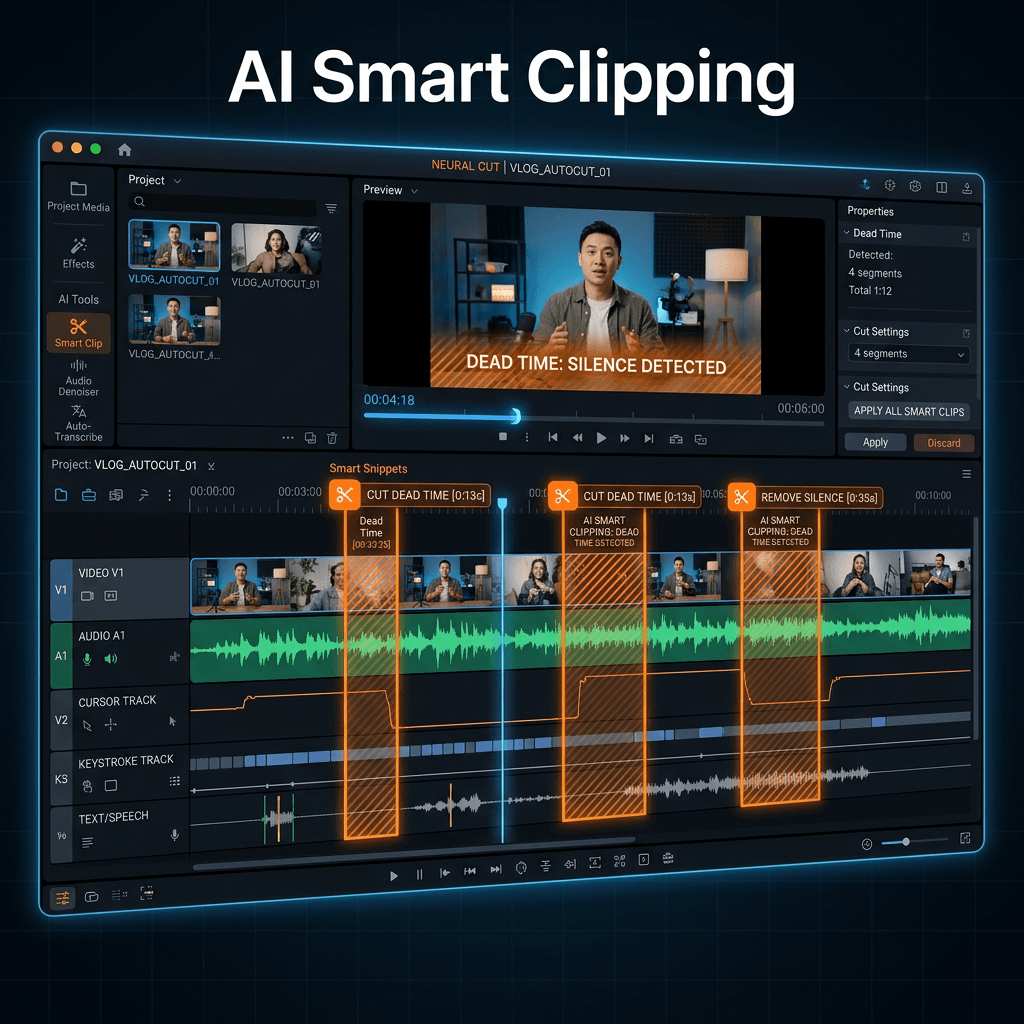
The dirty secret of screen recording: the recording takes 3 minutes, the editing takes 30. Most of that editing time is cutting silence — waiting for a page to load, fumbling with a menu, pausing to think about what to say next.
It's tedious. It's repetitive. It's exactly the kind of work AI should be doing.
That's why we built AI Smart Clipping.
The math: ~6 hours back every month
If you make 5 screen recordings per week, each taking 20 minutes of manual editing to cut dead time, that's 100 minutes a week wasted on scrubbing timelines.
Smart Clipping does that same work in roughly 30 seconds. Over a month, that's nearly 6 hours of your time recovered — and the cuts are usually cleaner than what you'd produce by hand at 11pm.
Multi-signal analysis (not just audio)
Most "auto-trim" tools only look at audio volume. That breaks the moment you pause silently to show something important — the tool happily cuts the demo, leaving you re-recording the section.
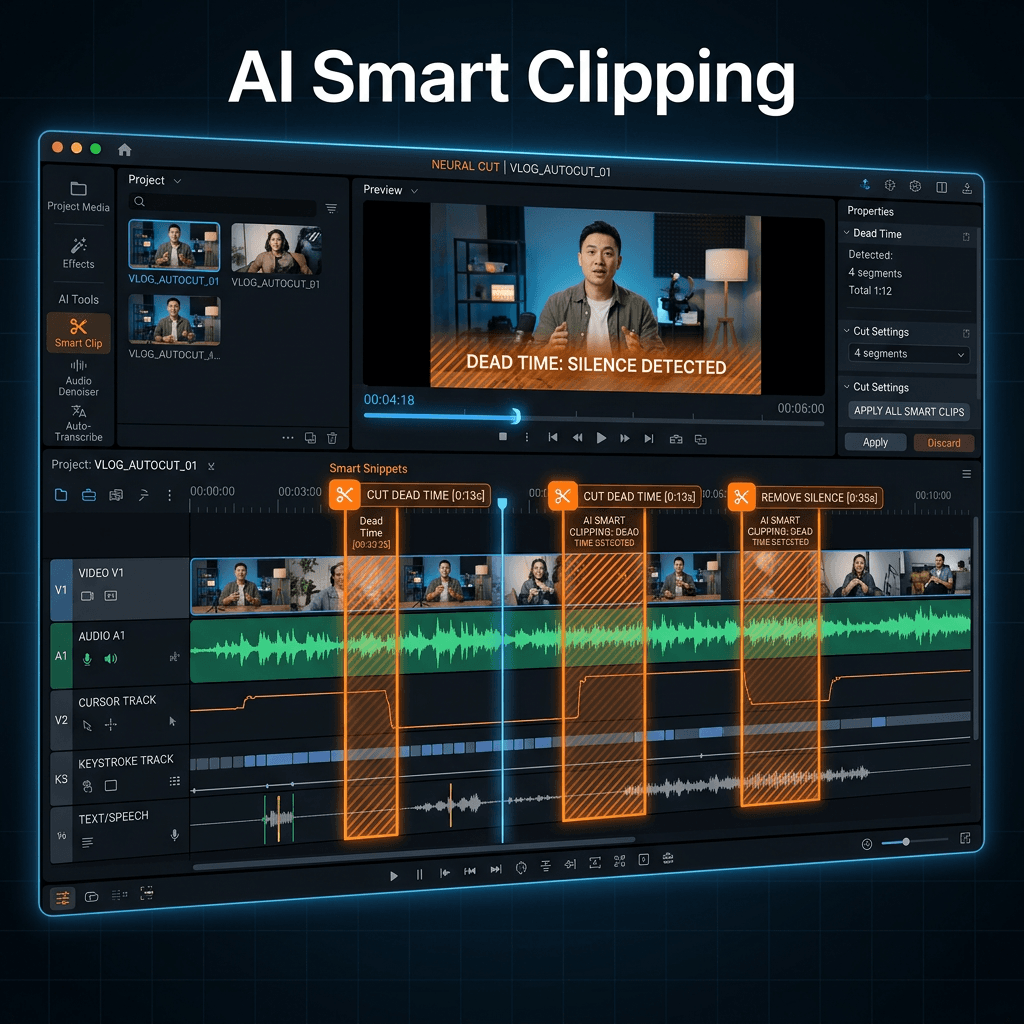
Smart Clipping correlates three independent signals before suggesting a cut:
- Audio silence — dBFS levels measured against a calibrated noise floor (not just "is the room quiet")
- Cursor inactivity — moments where the pointer hasn't moved
- Keystroke gaps — periods when you've stopped typing or pressing keys
When all three signals align, the AI marks that segment as high confidence dead time. When only one or two align, the segment goes into medium confidence — visible in the review panel but not suggested for cut.
This is why Smart Clipping handles tutorials, product demos, and code walkthroughs without the false-positive problem that plagues audio-only auto-trim.
Three presets for different rhythms
Not every video wants the same level of aggressiveness. Pick the preset that matches your style:
| Preset | What gets cut | Best for |
|---|---|---|
| Conservative | Long, obvious silences (3s+) | Tutorials with deliberate pauses, lecture-style content |
| Balanced | Silence > 1.5s, inactivity > 2s | Product demos, walkthroughs, most use cases |
| Aggressive | All detectable dead time including ~1s pauses | Social clips, short-form, fast-paced content |
You can switch presets mid-edit. The analysis re-runs in a few seconds.
Analyze → Review → Apply
We believe in AI-assisted editing, not AI-controlled. The workflow keeps you in the driver's seat:
- Analyze — Click the Smart Clipping button. The engine scans your timeline in 10–30 seconds for a typical 10-minute recording.
- Review — A panel lists every suggested cut: timecode in/out, duration removed, confidence score, and what triggered it (silence, inactivity, or all three).
- Toggle — Don't like a suggestion? Uncheck it. Want to merge two adjacent suggestions? One click.
- Apply — Click "Apply All" and watch your timeline collapse into the new, tighter version.
Nothing is destructive. Every cut is a non-destructive timeline edit you can undo or tweak afterwards.
Cascade: the whole project stays aligned
Smart Clipping isn't just about deleting clips. When you apply suggestions, Screenify automatically cascades the entire project:
- Annotation timing shifts to match the new timeline
- Zoom keyframes snap to the new cursor positions
- Camera layouts (webcam overlays, picture-in-picture tracks) re-align
- Callouts and spotlights move with their anchor frames
- Caption tracks (AI-generated or imported SRT) re-time
You don't end up with a faster video that has captions appearing at the wrong moment. Everything stays in sync.
100% on-device, no cloud upload
Smart Clipping runs entirely on your Mac.
Your audio is analyzed locally using Core ML. Your cursor and keystroke telemetry never leaves the device. Recordings often contain sensitive information — admin panels, customer data, pre-release product UI, API tokens visible on screen — and "AI-powered" shouldn't mean uploading that to someone else's server.
This is the same on-device-first philosophy behind AI Background Removal and AI Captions. The full feature stack works offline.
Where Smart Clipping fits in the workflow
A typical "polished demo in 10 minutes" flow with Smart Clipping:
- Record (3 min) — Just talk through the demo naturally. Pauses are fine.
- Smart Clipping (30 sec) — Apply Balanced preset, glance at the review panel, hit Apply.
- Auto-Zoom (30 sec) — Let the cursor-aware zoom engine handle the close-ups.
- Captions (1 min) — Auto-generate, glance for typos, burn in.
- Export — Metal GPU encode to MP4 or share to Screenify Cloud.
Total elapsed: under 6 minutes for a recording that would have taken 30+ to polish by hand.
FAQ
How does Smart Clipping decide what's "dead time" vs intentional pause? The confidence scoring — when audio silence + cursor inactivity + keystroke gaps all align, that's high-confidence dead time. A pause where you're silent but moving the cursor to highlight something stays. A pause where you're typing but the audio is silent stays. Only fully-idle moments get cut.
Will it cut my "umm"s and "uhh"s? Not directly — filler words have audio above the silence threshold. For filler-word removal specifically, that's on the roadmap as a separate feature ("Smart Filler Removal").
Does it work on imported recordings or only Screenify captures? Both. Import any MOV/MP4 into the timeline and run Smart Clipping. The cursor/keystroke signals will be unavailable for imported footage, so it falls back to audio-only analysis — still useful, but tune the preset to Conservative to avoid over-cutting.
Can I run Smart Clipping on a long recording (30+ min)? Yes. Analysis time scales roughly linearly — a 30-minute recording takes ~2 minutes to analyze on Apple Silicon.
What if I disagree with most of the suggestions? Try a different preset (Conservative if cuts feel too aggressive). You can also dismiss the entire suggestion set and Smart Clipping won't run again unless you re-trigger it.
Does it work offline? Yes. Everything runs on-device using Core ML and Apple's Neural Engine. No internet required.
Smart Clipping is available now in the latest Screenify Studio release. Download Screenify to try it — the free tier includes Smart Clipping with the Balanced preset; Pro unlocks all three presets and longer recording lengths.

Try Screenify Studio
Record your screen with auto-zoom, AI captions, dynamic backgrounds, and Metal-accelerated export. Free plan, unlimited recordings.
Download Free



