Mastering the Spotlight: Introducing Pro Callouts & 3D Effects
Creating professional demos shouldn't be tedious. Our new Callout system combines Zoom, Dimming, and 3D effects into a single, high-performance track.
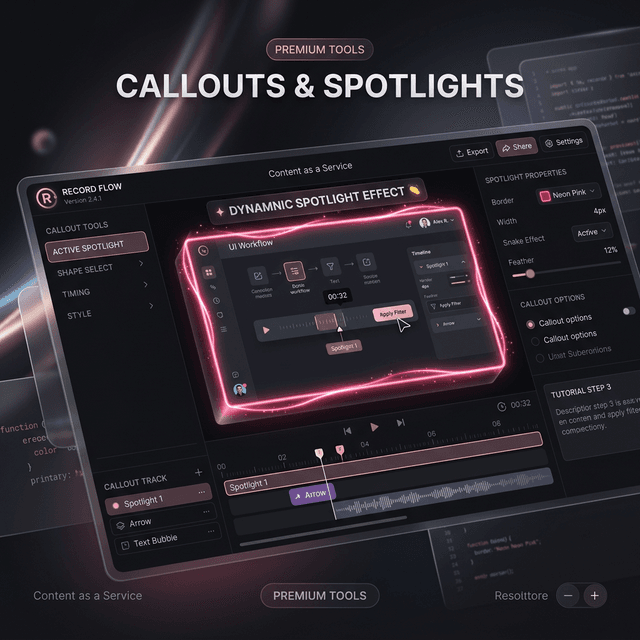
When you're creating a software demo or a technical tutorial, your biggest challenge isn't just recording the screen—it's guiding your viewer's attention. How do you make sure they don't miss that small button click or that specific line of code?
Today, we’re thrilled to introduce Callouts & Spotlights, a revolutionary all-in-one attention system for Screenify Studio.
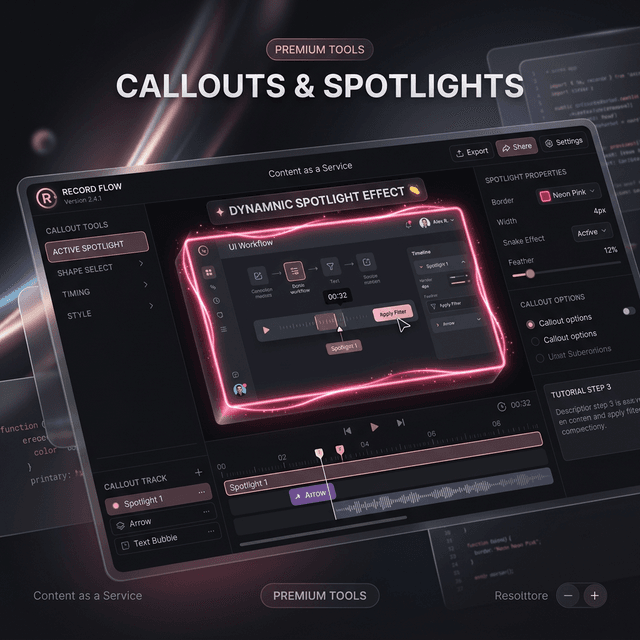
The All-in-One Callout Track
In the past, creating a "spotlight" effect meant manually adding a zoom region, then a darkening mask, and then a border. It was a multi-step process that made editing feel like a chore.
The new Callout Track changes everything. It combines four professional effects into a single timeline segment:
- Smart Zoom: Instantly magnify a specific area.
- External Dimming: Darken and optionally blur everything outside the spotlight.
- Visual Highlights: Add animated borders that trace the silhouette of your focus.
- 3D Elevation: "Lift" your spotlight off the screen with perspective tilt and realistic drop shadows.
Pro-Level Highlight Styles
A simple red box is fine, but professional content needs more flair. We’ve implemented 8 unique Highlight Styles inspired by top-tier editing software:
- Snake & Trace: Animated gradient segments that travel around the perimeter of your spotlight.
- Neon Pulse: A glowing, breathing border that adds a futuristic touch.
- Shimmer: A subtle vệt sáng quệt qua (light sweep) that adds life to static UI elements.
- Underline: Perfect for highlighting text or code blocks with a growing progress bar.
Cinematic Reveals
First impressions matter. Instead of your spotlight just "appearing," you can now use Cinematic Reveals.
Imagine a UI button flying in from perspective (Fly3d) or slamming onto the screen with a slight bounce (Slam3d). These aren't just animations; they are physics-based transitions that make your demonstration feel incredibly polished.
Performance-First Design
Powerful effects shouldn't slow you down. Our Callout system is built on a custom rendering engine that leverages CSS @property and Shader SDFs.
This means you get a silky-smooth 60FPS preview while you’re editing, even with complex 3D tilts and animated glows active. When it's time to share, our Metal-accelerated export engine ensures every frame is rendered with pixel-perfect precision.
Whether you're building the next great SaaS demo or teaching a coding masterclass, Callouts & Spotlights are here to help you shine.

Try Screenify Studio
Record your screen with auto-zoom, AI captions, dynamic backgrounds, and Metal-accelerated export. Free plan, unlimited recordings.
Download Free



