Introducing MacBook 3D Device Frames: Create Cinematic App Demos Instantly
Transform flat Mac screen recordings into stunning, realistic presentations. Frame your product in 3D MacBook mockups with dynamic canvas dragging, optical lens control, and cinematic motion sweeps.
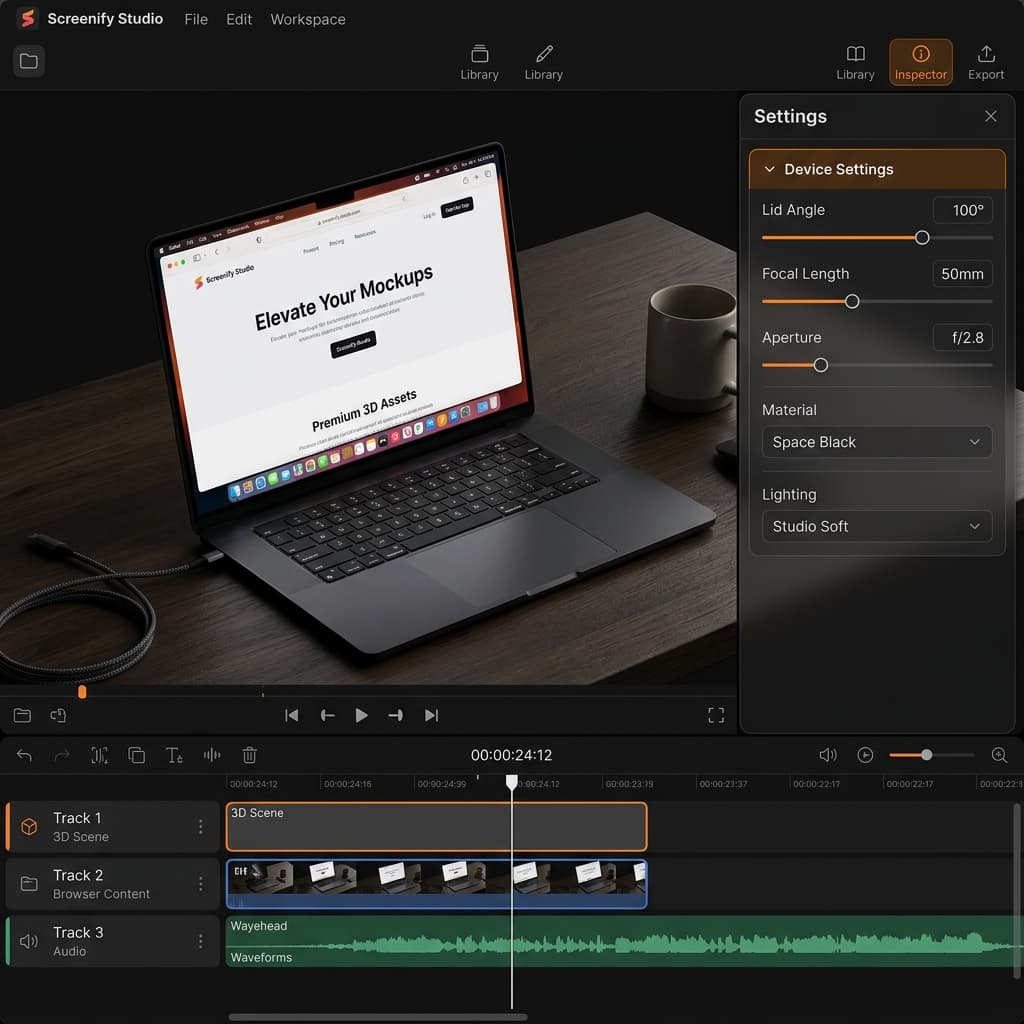
A flat screen recording shows how your product works. A cinematic presentation shows why your product matters.
In today's competitive landscape, static captures of a browser tab or dashboard often fail to capture the premium feel of your software. Audiences expect high-fidelity, polished, and visually engaging storytelling.
Today, we are thrilled to introduce a massive update to Screenify Studio: MacBook 3D Device Frames.
Now, with a single click, you can wrap your desktop screen recordings in stunning, physically-grounded 3D laptop mockups, complete with camera optics, realistic office backdrops, premium desk surfaces, and professional commercial camera sweeps. Here is everything new in this feature release.
1. Flagship 3D Models: MacBook Pro & MacBook Neo
Rather than placing your desktop capture inside a flat 2D vector bezel, Screenify Studio now maps your recording onto fully interactive 3D laptop models in real-time:
- MacBook Pro 16": A perfect digital recreation of Apple's flagship workhorse, complete with curved aluminum bezels, detailed speaker grills, side port configurations, and an optional screen notch.
- MacBook Neo: A sleek, concept laptop model featuring ultra-thin uniform bezels and an active dynamic display layout.
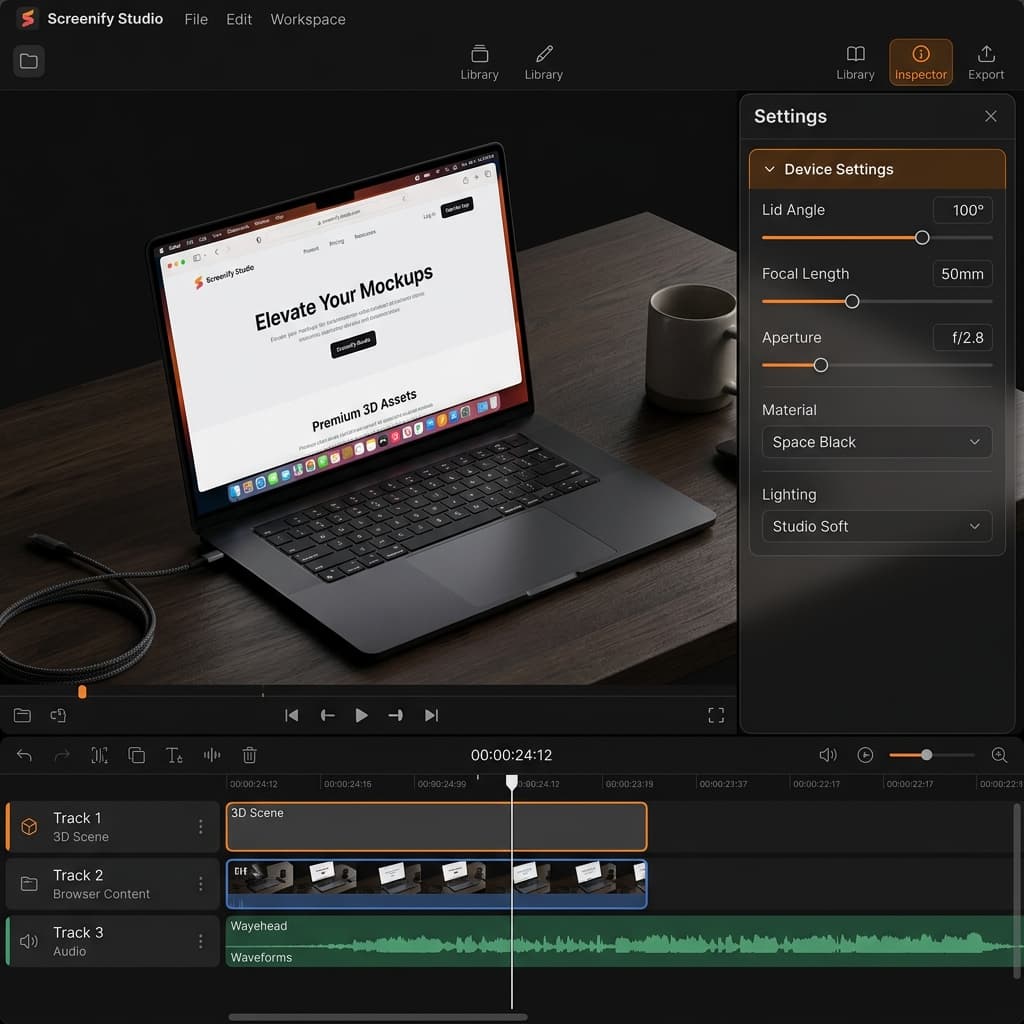
For the MacBook Neo, we have engineered a fully rigged screen lid. You can control the physical lid opening angle from 0° (fully closed) up to 130° (leaned back) directly from the timeline to create gorgeous entrance and exit animations.
2. Infinite Customization: The 8-Section Control Panel
To give you total creative freedom over your presentation, we have expanded our customization settings into a comprehensive 8-Section Control Panel:
1. Frame Styles
Toggle between 3D Mode and 2D Flat Mode. In 3D mode, swap the laptop's aluminum finish (Cosmic Orange, Deep Blue, Space Gray, Silver, or Space Black) to match your brand palette, or toggle the screen notch visibility.
2. Camera Optics (Lens)
Screenify Studio now simulates physical camera lenses. Adjust the Focal Length slider to switch from a wide-angle 24mm view to a tight 200mm telephoto view, compressing the background realistically. Control the background blur using the f-stop aperture setting, and toggle Autofocus to lock focus on the center of the laptop.
3. Tactile View Controls
Set your resting zoom, adjust the scale of your content inside the display frame, change the Lid Angle, and toggle Camera tracks lid to automatically adjust the camera height in sync with the screen angle.
4. macOS Menu Bar Overlay
Make raw window captures look like authentic macOS presentations. Toggle a translucent macOS-compliant menu bar displaying the official Apple logo, carrier status graphics, system clock, and an auto-detected active app name (which updates based on your actual window interactions or a manual text override).
5. Office & Studio Backgrounds (Lazy HDRI)
Place your device in realistic environments. Choose from a library of high-resolution backdrops—including a professional warm studio, a modern office, a warm café, or a quiet library. Non-default environments are downloaded on-demand from our high-speed Cloudflare CDN and cached locally, complete with exposure brightness and Y-axis rotation controls.
6. Desk Surfaces (PBR Materials)
Anchor the laptop inside the virtual scene by sitting it on a premium Desk Surface. Select from 5 Physically-Based Rendering (PBR) materials: Oak Wood, Elegant Marble, Clean Concrete, Premium Leather, or procedural Glass. Adjust roughness, grain rotation, and table height offset sliders to craft your scene.
7. Lighting & 8. Scene reflections
Choose from 6 studio light rigs and toggle realistic Ground Shadows and Screen Glare reflections to make the physical device mockup blend into its surrounding environment.
Try Screenify Studio — free, unlimited recordings
Auto-zoom, AI captions, dynamic backgrounds, and Metal-accelerated export.
3. Cinematic Camerawork Made Simple
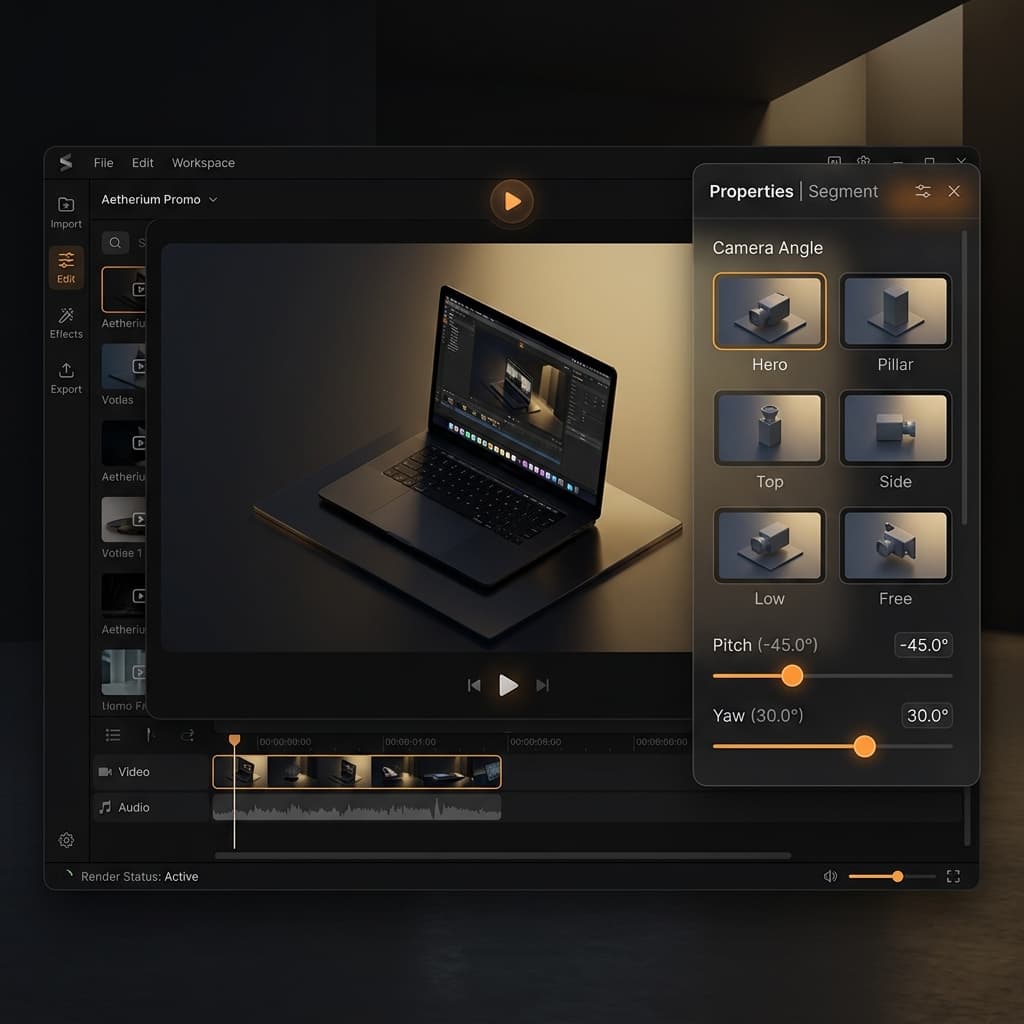
High-end commercial sweeps are no longer locked behind complex, manual keyframing. We have completely redesigned the segment properties panel to put a virtual director at your fingertips:
- The Camera Gallery: Instead of adjusting complex X/Y/Z coordinate sliders, select from 6 pre-rendered thumbnails representing cinematic camera angles (Hero, Pillar, Top, Side, Low, and Free). Tapping an angle snaps the camera instantly to that position, with fine-tuning pitch and yaw sliders.
- 6 Camera Motion Sweeps: Apply dynamic, multi-axis paths to your timeline. Choose Drift for a gentle handheld camera bob, Lid Reveal to animate the laptop lid opening during your introduction, Pull Back for a dramatic sweep, or Vertigo for a Hitchcock-style dolly-zoom.
4. Under the Hood: Pure Performance, No Compromises
To ensure the editing experience is as satisfying as the final video, we built several performance-focused safeguards into the viewport engine:
- Plane-Locked Cursors: Flat mouse overlays look cheap when a 3D device tilts. Screenify Studio projects cursor coordinates directly into the 3D plane of the laptop display. Your cursor trails and click ripples tilt and scale in absolute perspective harmony with the moving hardware frame.
- Smart Viewport Optimization: Heavy depth-of-field post-processing is resource-intensive. Screenify Studio intelligently pauses complex depth blur algorithms while you are scrubbing the timeline to maintain a buttery-smooth 60 FPS editing preview, applying the sub-pixel calculations during final rendering.
- Full Composite Screen Stage: The display screen renders your screen capture and wallpaper in absolute color-accuracy, independent of outer environment light sources, keeping your interface crisp and readable.
Elevate Your Product Demos Today
The MacBook 3D Device Frame System is available now in the latest Screenify Studio update (v1.9.0).
Open the editor, select your recording, pick a motion sweep, and elevate your software presentation to the standard it deserves.

Try Screenify Studio
Record your screen with auto-zoom, AI captions, dynamic backgrounds, and Metal-accelerated export. Free plan, unlimited recordings.
Download Free



